Cursor vs Cline Comprehensive Comparison: 8 Free Usage Methods and Feature Evaluation
With the rapid development of AI-assisted programming technology, Cursor and Cline have become two of the most popular AI programming assistants in the developer community. As a seasoned developer who relies on AI to enhance coding efficiency, I have extensively used and tested these two tools. This guide will help you understand their core differences and provide eight verified methods for free usage.
Effective as of May 2025: Based on real project development experiences and community user feedback, revealing the performance differences between Cursor and Cline in various development scenarios, along with the latest free usage tips!
Quick Selection Guide: Which Tool is Right for You?
Before diving into a detailed comparison, let’s quickly understand the positioning and target audience of both tools:
Cursor is Best For:
- Teams seeking an end-to-end solution: Independent IDE experience with comprehensive built-in features.
- Enterprise users: Offers more robust team collaboration and enterprise support features.
- Developers needing a stable experience: As a commercial product, updates are more stable.
- Frontend/full-stack developers: Excels in web development scenarios.
- Users who prefer subscription models: Fixed pricing with unlimited usage.
Cline is Best For:
- Developers pursuing high customization: Freedom to choose underlying AI models and configurations.
- Cost-conscious individuals or small teams: Pay-per-use model suitable for limited budgets.
- Open-source ecosystem enthusiasts: Exists as a VS Code extension, compatible with many plugins.
- Developers handling large codebases: Advantageous for managing large projects.
- Users who prefer pay-as-you-go: Pay only for what you use, making it more economical for infrequent use.
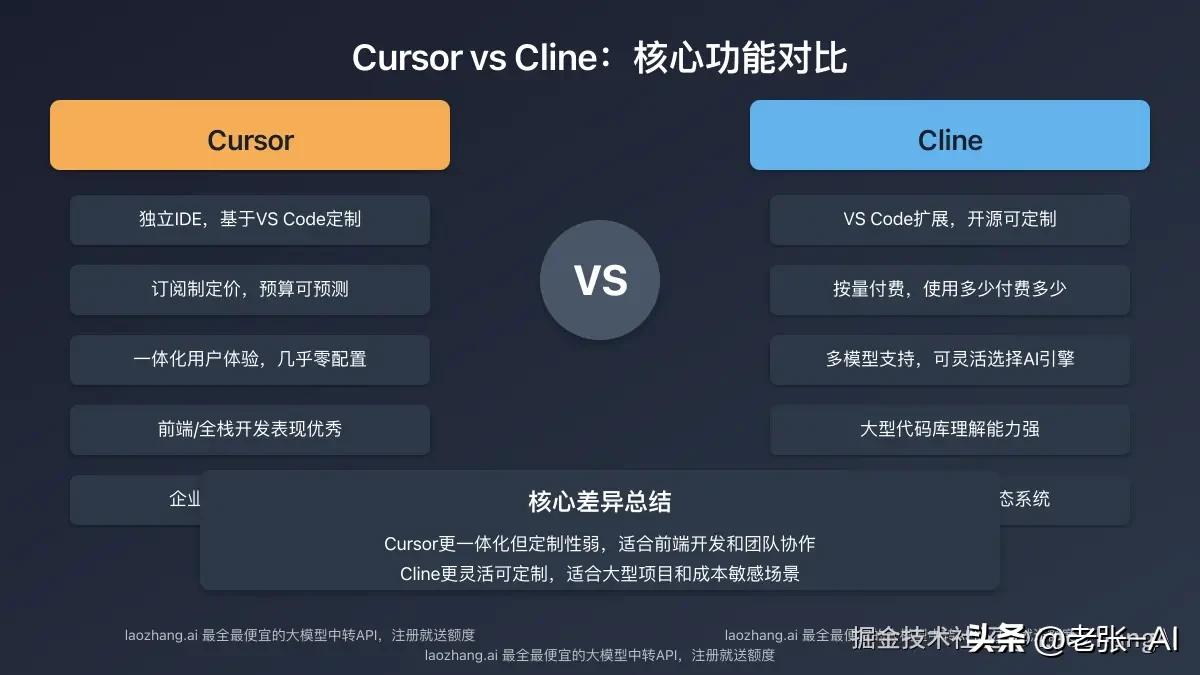
Core Difference: Cursor is an independent IDE with a subscription model; Cline is a VS Code extension with a pay-per-use model. Cursor is more integrated but less customizable, while Cline is more flexible but requires more configuration.
Basic Comparison: Essential Differences Between Cursor and Cline
| Feature | Cursor | Cline |
|---|---|---|
| Type | Independent IDE (customized based on VS Code) | VS Code extension |
| Release Date | Early 2023 | Late 2023 |
| Development Team | Cursor Team (YC-backed) | Fixie.ai |
| Open Source Status | Closed-source commercial software | Open-source (MIT License) |
| Underlying Model | Primarily Claude (customizable API Key) | User-selectable (supports Claude, GPT, etc.) |
| Billing Model | Subscription + usage limits | Pay-per-use (token) |
| Installation Method | Standalone installer | Installed from VS Code marketplace |
| Latest Version | 0.46 | 3.5 |
These foundational differences determine the user experience and applicable scenarios for both tools. Next, we will delve into a multi-dimensional comparison of their actual performance.
Core Feature Comparison: Detailed Evaluation Across 8 Key Dimensions
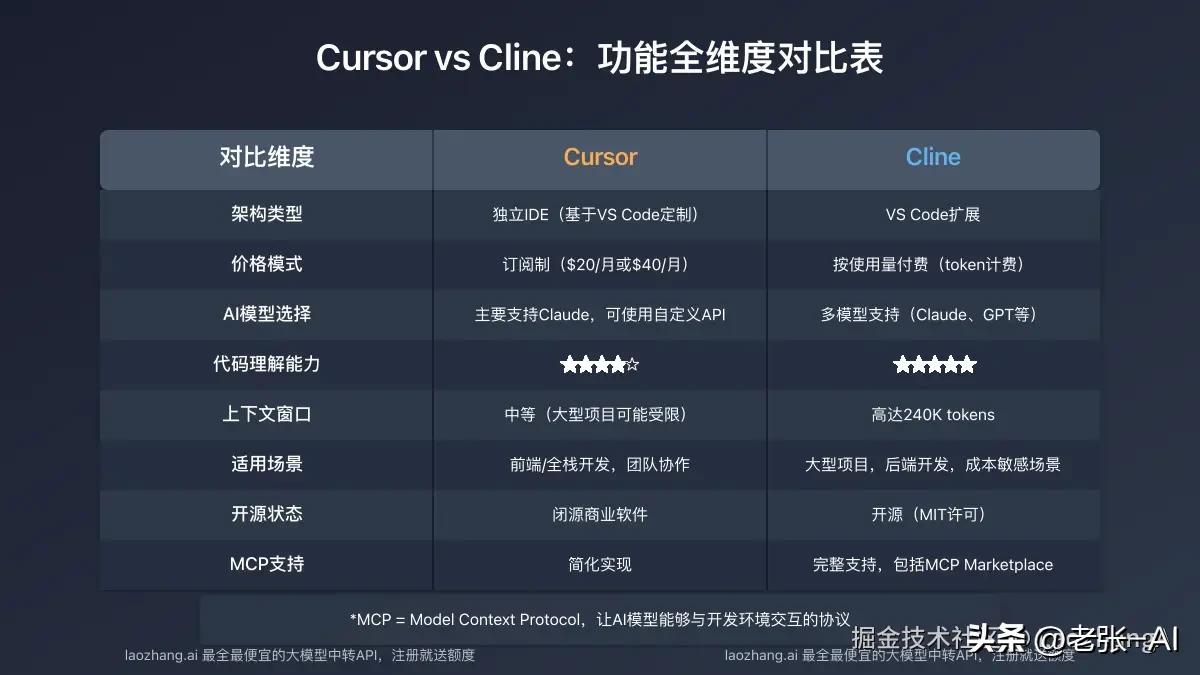
After three months of in-depth usage and testing across multiple real projects, I compared the performance of Cursor and Cline across eight key dimensions:
1. Code Understanding and Generation Capability
Cursor:
- The Claude model used excels at code understanding.
- Code generation speed is slightly faster, with more immediate responses.
- Deeper understanding of common programming patterns and best practices.
- Generated code comments are more comprehensive and standardized.
Cline:
- Supports multiple AI models, allowing users to choose the most suitable one.
- Deeper understanding of large codebases, better grasp of project context.
- Slightly superior ability to analyze code structure, especially in complex projects.
- Real tests show that when using the Claude 3.7 Sonnet model, code quality is comparable to Cursor.
Real-world findings: In handling a large codebase of 240K tokens, Cline demonstrated a deeper understanding of the overall project structure, while Cursor responded slightly faster for generating single-file code.
2. Development Process Integration
Cursor:
- As an independent IDE, it provides a more integrated experience.
- The built-in chat interface is more intuitive and user-friendly.
- Better visual support for Git operations.
- File navigation and code jumping features are optimized for better experience.
Cline:
- As a VS Code extension, it integrates seamlessly with existing development toolchains.
- Supports collaboration with other VS Code extensions.
- High degree of customization to adapt to various development processes.
- Supports a rich set of commands and shortcut customizations.
3. Pricing and Cost Structure
Cursor:
- Three plans: Free version, Pro version ($20/month), and Enterprise version ($40/user/month).
- Each plan has different usage limits and features.
- Fixed subscription fees provide predictable cost structure.
- Offers more additional features and support for enterprise users.
Cline:
- Pay-per-use (token) model, pay only for what you use.
- Freedom to choose different priced AI models to control costs.
- Suitable for developers with irregular usage frequency.
- Monthly cost for light usage is approximately $15-30 (depending on usage).
Cost comparison: Based on moderate usage (about 100 queries per day), Cline’s monthly cost is around $25, while Cursor Pro is fixed at $20/month. However, under high usage, Cursor may require additional custom API keys.
4. User Interface and Experience
Cursor:
- Interface designed specifically for AI programming, intuitive and easy to use.
- Chat interface seamlessly integrates with code editing.
- Built-in shortcuts for various AI-assisted features.
- More user-friendly for newcomers, almost zero configuration needed.
Cline:
- Fully integrated within VS Code, no adaptation needed for VS Code users.
- Interface is relatively simple, but functional areas may not be intuitive.
- Highly customizable based on personal preferences.
- Slightly steeper learning curve requiring some configuration.
5. Handling Large Projects
Cline:
- Excels in handling large codebases, capable of understanding more complex project structures.
- Supports context windows of up to 240K tokens (when using Claude 3.7).
- Excellent file indexing performance, providing a comprehensive understanding of project dependencies.
- Good support for multi-repository projects.
Cursor:
- Can also handle large projects but may be slightly less capable than Cline on extremely large codebases.
- Built-in code navigation features make browsing large projects more convenient.
- Particularly strong support for large frontend projects.
- File search and locating features are optimized for a better user experience.
⚡ Real-world results: In handling a React project with over 100 files, Cline performed slightly better in understanding component dependencies, while Cursor provided a better user experience in cross-file editing.
6. Programming Language and Framework Support
Cursor:
- Supports almost all mainstream programming languages.
- Excels in the JavaScript/TypeScript ecosystem.
- Outstanding support for frontend frameworks like React and Vue.
- Excellent support for Python in the data science field.
Cline:
- Based on VS Code’s language support, it supports almost all mainstream languages.
- Particularly strong in backend languages like Java, Go, and Rust.
- Support for emerging languages and frameworks depends on the underlying model’s capabilities.
- Can enhance support for specific languages by selecting specialized models.
7. Customization and Extensibility
Cline:
- As an open-source tool, it allows for deep customization and secondary development.
- Users can choose from various underlying AI models, even mixing them.
- Fully compatible with the VS Code ecosystem, leveraging thousands of extensions.
- Supports custom prompt templates and workflows.
Cursor:
- Offers limited customization options, but core functionalities cannot be modified.
- Custom API keys can be used, but model selection is limited.
- Built-in templates and presets can meet most scenario needs.
- Closed ecosystem ensures a consistent user experience.
8. Community and Support
Cursor:
- Commercial support team provides more formal and timely responses.
- Comprehensive official documentation and learning resources.
- Regular official updates and roadmaps.
- Exclusive support channels for enterprise customers.
Cline:
- Active open-source community where users can participate in development and improvements.
- Issues and feature requests can be submitted directly on GitHub.
- Community-driven documentation and tutorials.
- Support primarily through community forums and GitHub issues.
Scenario Comparison: Performance Evaluation in Different Development Scenarios
The performance of both tools varies significantly based on different development scenarios and project types:
Web Application Development
Cursor: ⭐⭐⭐⭐⭐ (5/5)
- Excellent support for frontend frameworks like React and Vue.
- Built-in optimized web development workflow.
- Better support for frontend debugging and previewing.
Cline: ⭐⭐⭐⭐☆ (4/5)
- Performs excellently in understanding complex frontend architectures.
- In-depth analysis of component dependency relationships.
- Requires additional configuration for optimal frontend development experience.
Backend/API Development
Cline: ⭐⭐⭐⭐⭐ (5/5)
- Deeper understanding of complex backend systems.
- Excels in database design and optimization.
- Better understanding of microservices architecture.
Cursor: ⭐⭐⭐⭐☆ (4/5)
- Efficient and accurate backend code generation.
- Excellent API documentation generation capabilities.
- Slightly less understanding of complex system architectures compared to Cline.
Mobile Application Development
Cline: ⭐⭐⭐⭐☆ (4/5)
- Good support for native mobile development.
- Can optimize mobile development experience through model selection.
- Integration with mobile development toolchains is average.
Cursor: ⭐⭐⭐⭐☆ (4/5)
- Outstanding support for cross-platform frameworks like React Native.
- Useful mobile UI component recommendation features.
- Good integration with mobile debugging tools.
Data Science/Machine Learning
Cursor: ⭐⭐⭐⭐⭐ (5/5)
- Native-level support for Jupyter Notebook.
- Strong data visualization code generation capabilities.
- Comprehensive support for machine learning libraries and frameworks.
Cline: ⭐⭐⭐⭐☆ (4/5)
- Quality support can be achieved by selecting specialized AI models.
- Accurate understanding of algorithms and optimization suggestions.
- Good understanding of the Python scientific computing ecosystem.
Large Enterprise Projects
Cline: ⭐⭐⭐⭐⭐ (5/5)
- Excellent support for extremely large codebases.
- Capable of handling complex multi-repository projects.
- Cost structure suitable for large-scale use.
Cursor: ⭐⭐⭐⭐☆ (4/5)
- Comprehensive enterprise-level support and collaboration features.
- Team sharing features facilitate knowledge transfer.
- Subscription model suitable for enterprise budget planning.
8 Free Usage Methods: Verified Ways to Access Cursor and Cline for Free
As developers, we all hope to use these powerful AI programming tools without incurring additional costs. Here are eight verified methods for free usage:
1. Utilize the Basic Quota of Cursor’s Free Version
Cursor offers a free version, which, despite certain limitations, is sufficient for individual developers:
- Monthly limit of 500 AI requests.
- Supports basic code generation and completion features.
- Can handle small to medium-sized projects.
- No credit card required for registration.
Usage Steps:
- Visit the Cursor official website to download the latest version.
- Register an account using your email (no credit card needed).
- Install and log in to start using it.
Expert Tip: Allocate daily usage wisely to avoid exhausting the quota at the beginning of the month. Leave more complex tasks for Cursor and handle simpler coding tasks yourself.
2. Obtain Cursor Pro Free Version Using an Educational Email
If you have an educational email (.edu), you can obtain the Cursor Pro version for free for one year:
- Monthly increase of 1000 AI requests.
- No functional limitations, complete Pro version experience.
- Can connect custom models.
- Valid for 12 months.
Application Steps:
- Register a Cursor account using your educational email.
- Apply for the educational version in account settings.
- The system automatically verifies the email’s validity.
- Upon approval, your account will be upgraded to Pro version automatically.
3. Use the Open-Source Cline Free Version
As an open-source project, Cline’s basic features are completely free to use:
- No payment required to install the basic version.
- Supports connecting your API Key.
- Custom modifications and extensions are allowed.
- Continuously updated on GitHub.
Installation Method:
- Open the VS Code extension marketplace.
- Search for “Cline” and install it.
- Restart VS Code and configure the AI model and API Key.
- Start using the basic features for free.
4. Use Free Quotas from OpenRouter to Connect Cline
OpenRouter provides a certain amount of free tokens that can be used with Cline:
- Monthly free token quota available.
- Supports various models, including Claude and GPT.
- Simple configuration to use in Cline.
- Suitable for light usage scenarios.
Configuration Steps:
- Register an account on OpenRouter.
- Obtain an API key.
- Configure the OpenRouter endpoint and API key in Cline settings.
- Choose suitable free or low-cost models.
Optimization Tip: Using more economical models like “Qwen 2.5 Coder 32B” can significantly reduce token consumption, allowing for more free usage time.
5. Utilize LaoZhang.AI’s API Service for Free Usage of Both Tools
LaoZhang.AI offers comprehensive and economical AI model proxy services that can work perfectly with Cursor and Cline:
- Free usage quota upon registration.
- Supports various top-tier models including Claude, GPT, and Gemini.
- Prices are only 50-70% of the official rates.
- Stable and reliable global acceleration services.
Configuration Method:
- Visit LaoZhang.AI to register an account.
- Obtain API key and endpoint information.
- Configure the custom API in Cursor or Cline.
- Start using advanced AI features at ultra-low costs.
Comments
Discussion is powered by Giscus (GitHub Discussions). Add
repo,repoID,category, andcategoryIDunder[params.comments.giscus]inhugo.tomlusing the values from the Giscus setup tool.